Samsung is keeping Galaxy S25 owners busy with yet another beta release. The company has started rolling out One UI 8 Beta 7 to the Galaxy S25 series, making it the seventh test build ahead of the stable Android 16-based One UI 8 update. This move has caught many by surprise, as most users expected the beta program to wrap up sooner, raising hopes that the stable version is now very close.
Galaxy S25 lineup receives One UI 8 Beta 7 update
The latest beta is now available for the Galaxy S25, Galaxy S25+, and Galaxy S25 Ultra across all supported regions, including India, Germany, South Korea, the UK, and the US. The update carries firmware version ZYI3 and weighs around 600MB, which clearly indicates that Samsung has kept its focus on refinements rather than new additions.
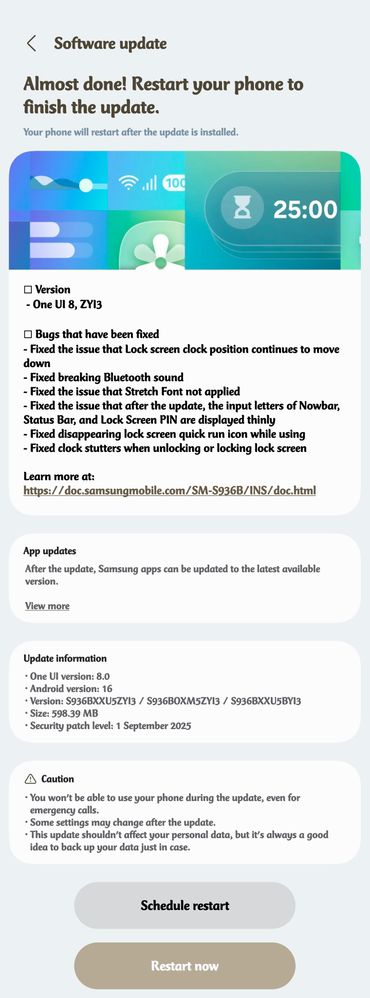
Like most late-stage betas, this release doesn’t introduce flashy new features but instead focuses on fixing lingering bugs and improving stability. It fixes the stutter that some users noticed with the lock screen clock and also resolves a bug where the clock unexpectedly shifted down the screen.
Bluetooth audio glitches have been ironed out, and Stretch Font now applies correctly across the interface. Samsung has also restored normal text thickness in areas like the Nowbar, Status Bar, and PIN input screen, while fixing a problem where the quick run icon disappeared from the Lock Screen.
These changes may not sound groundbreaking, but they are essential in ensuring the stable version delivers a smooth and reliable experience. There could also be a few under-the-hood improvements that Samsung hasn’t explicitly mentioned.
Related: Samsung One UI 8 update rollout timeline tipped
The next one could be a stable release
With Beta 7 now live, the Galaxy S25 series beta program has stretched further than many expected. Samsung has already confirmed that the stable One UI 8 update will be released in September, though the exact date remains unannounced. However, according to a recently leaked timeline, the stable update will be released next week. It means this could be the final beta build.
For now, users enrolled in the beta can head to Settings > Software update > Download and install to grab Beta 7, while others won’t have to wait too long for the official release.