Realme is kickstarting another wave of its Android 16 beta program, inviting more users to test the upcoming Realme UI 7.0. The seventh round of the Early Access program is now open, bringing six more budget and mid-range phones into the testing fold as the company continues to expand its preview ahead of a stable release.
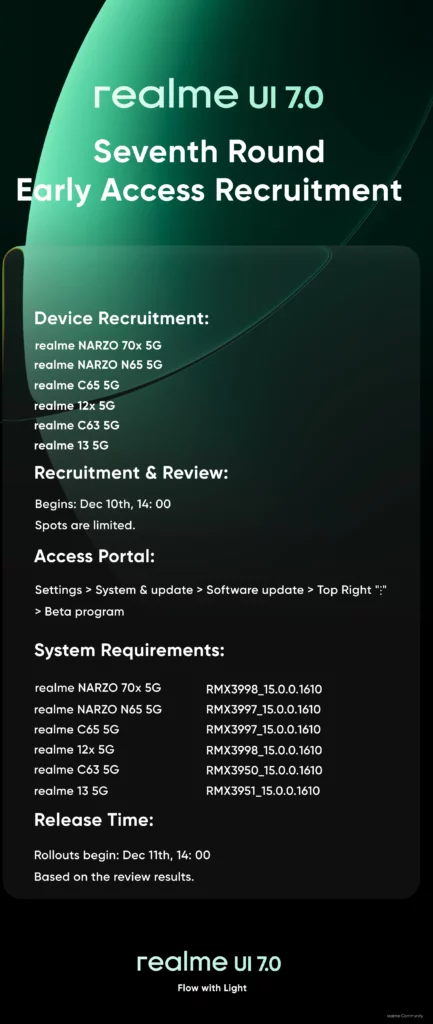
The latest batch includes the Realme 13, Realme 12x, and the Realme Narzo 70x. It also extends to the Narzo N65, Realme C65, and Realme C63. For now, this closed beta is limited to participants in India, with a cap of 2,000 testers for each specific model, as mentioned on the announcement page.
Eligibility and rollout timing
To be eligible, your device must be running on a specific required software version:
- Realme 13 5G: RMX3951_15.0.0.1610
- Realme 12x 5G: RMX3998_15.0.0.1610
- Realme Narzo 70x 5G: RMX3998_15.0.0.1610
- Realme Narzo N65 5G: RMX3997_15.0.0.1610
- Realme C65 5G: RMX3997_15.0.0.1610
- Realme C63 5G: RMX3950_15.0.0.1610
You can check your current version in your phone’s settings to ensure you meet this prerequisite before applying.
Registration is already live and will remain open until all the slots for each phone are filled. The process is first-come, first-served, so interested users will want to act quickly. Realme states that the actual beta software will start rolling out to selected applicants in batches from 2:00 PM IST on December 11.
Jumping into the Early Access program gives you a firsthand look at the new features and design changes in Realme UI 7.0. This includes a visual overhaul, performance boosts from the Trinity Engine, and various system-level enhancements. It’s important to remember that this is beta software, meaning it may contain bugs and stability issues.
Some third-party apps might not work correctly on the new Android 16 base, so it’s not recommended for your primary device. If you do proceed, taking a full backup of your important data is a crucial step to avoid any potential loss.
How to apply for the Realme UI 7.0 Early Access program?
The application process is straightforward but requires you to have Developer Options enabled. You can activate this by going to Settings > About device > Version, and then tapping on “Version Number” seven times.
Once Developer Options are enabled, navigate to Settings > About device and tap on the “realme UI 7.0” banner at the top. Tap the three dots in the upper-right corner, select “Beta program,” and then choose “Early Access.” From there, you can hit “Apply Now” and submit your details to complete the application.
Before you start the installation, ensure your phone has at least 60% battery charge and a minimum of 15GB of free storage space for a smooth upgrade to Android 16.